There’s a lot moving in the Microsoft ecosystem this June, and a few of these updates carry deadlines worth acting on before they pass. The biggest is July 1, when commercial Microsoft 365 prices go up and a new set of permanent Copilot SKUs for SMBs go live. Here’s what to have on your radar this month, and what each change means for you and your customers.
TLDR: Deadlines and pricing updates
Short on time? Here’s what’s time-sensitive and what’s changing financially.
Deadlines to watch
- June 30, 2026: Final day to submit FY26 Business Applications Partner Activities (BAPA) claims
- July 1, 2026: Commercial Microsoft 365 suite price increases take effect
- July 1, 2026: New permanent Microsoft 365 Business with Copilot SKUs launch
- December 31, 2026: New 25% promo on Business Basic plus Copilot Business ends
Pricing at a glance
- Commercial Microsoft 365 suites: increases across most SKUs (full table below)
- New — Business Basic + Copilot Business: $252 USD/user per year (with the new 25% promo)
- New — Business Standard + Copilot: $282 USD/user per year
- New — Business Premium + Copilot: $384 USD/user per year
- New — Microsoft 365 Copilot: 3-year purchasing option
- Windows 365 Business: Windows Hybrid Benefit SKUs no longer available for new purchases
Product and feature updates
New Microsoft 365 Business with Copilot SMB SKUs
Starting July 1, 2026, Microsoft is turning promotional Copilot Business offers into new permanent Microsoft 365 Business with Copilot SKUs that maintain the promotional price of these bundles. These new offers simplify SMB AI adoption and enable a stronger partner-led motion.
At the same time, Microsoft is also launching a new 25% promotional offer on Microsoft 365 Business Basic plus Copilot Business available through December 31, 2026. This provides a more accessible entry point for Business Basic customers who would like to get started with Copilot at $252 USD/user per year.
Here are the new permanent offers (1 to 300 seats, annual commit with annual billing):
- Business Standard + Copilot Business: $282 USD/user per year
- Business Premium + Copilot Business: $384 USD/user per year
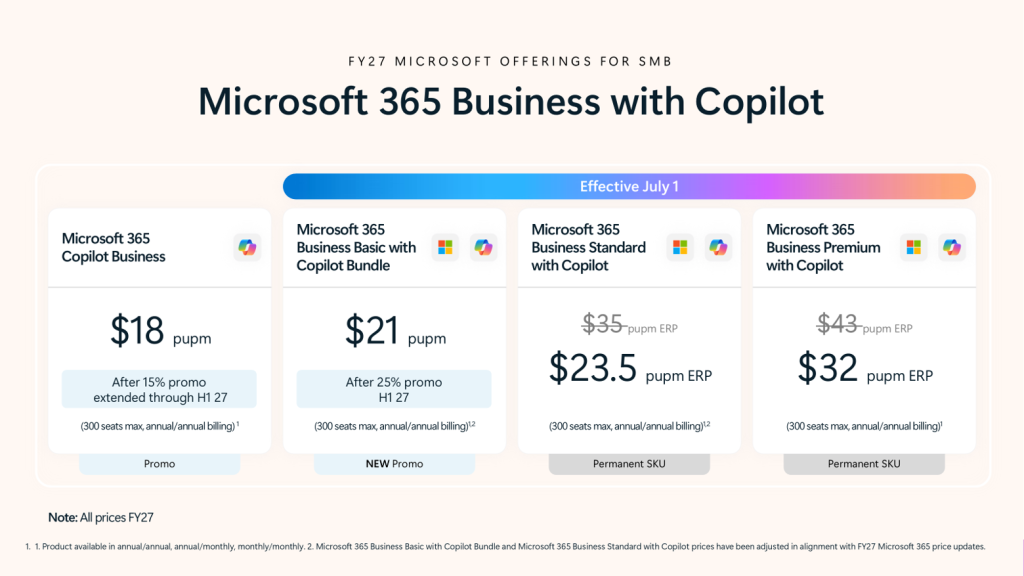
What this means for you: Standardized SKUs simplify the SMB sales motion and give you a stronger opportunity to drive recurring revenue and services around AI. These SKUs are ideal for SMB customers who are ready for scalable AI adoption while helping MSPs build repeatable growth and long-term revenue around Microsoft 365 Business with Copilot. Learn more.
Reminder: Microsoft 365 E7 and Agent 365 are generally available
Microsoft 365 E7 is Microsoft’s premium suite, powered by Work IQ. It bundles Microsoft 365 E5, Microsoft Entra Suite, Microsoft 365 Copilot and Microsoft Agent 365 into a single solution that integrates with the apps and security stack your customers already rely on.
What this means for you: E7 gives you a simplified upgrade path for mature customers looking to move from AI experimentation to running secure AI and agents at scale. Learn more.
New 3-year purchasing option for Microsoft 365 Copilot
As of May 1, Microsoft has introduced a 3-year purchasing option for Microsoft 365 Copilot in CSP, aligning it with existing E3 and E5 terms. A new 3-year term enables bigger, longer-term Copilot investments with stronger services opportunities for partners.
What this means for you: Longer terms open the door to larger deals and higher-value services around deployment, adoption, governance and optimization. Learn more.
Reminder: Windows 365 Business Windows Hybrid Benefit end of sale
To simplify the Windows 365 Business portfolio, Microsoft has retired the Windows Hybrid Benefit (WHB) SKUs. As of May 1, 2026, there are no new WHB purchases. Existing customers are unaffected and can keep using and renewing their current subscriptions, but there’s no automatic migration to other SKUs.
What this means for you: The lineup is simpler now and is aligned with the recent Windows 365 Business price improvements. If any of your customers are on WHB SKUs and may need to migrate, you have an opportunity to help them evaluate and plan the transition. Learn more.
Pricing updates and promotions
Reminder: July 1 pricing updates for commercial Microsoft 365 suites
This is the big one to act on this month. Microsoft has announced price increases that will apply to new and renewing customers starting July 1, 2026. Existing customers will see the new prices at their next renewal after that date.
| Microsoft 365 suite | Current list price | List price as of July 1, 2026 |
| Business Basic | $6 | $7 |
| Business Standard | $12.50 | $14 |
| Business Premium | $22 | $22 |
| Office 365 E1 | $10 | $10 |
| Office 365 E3 | $23 | $26 |
| Microsoft 365 E3 | $36 | $39 |
| Microsoft 365 E5 | $57 | $60 |
| Microsoft 365 F1 | $2.25 | $3 |
| Microsoft 365 F3 | $8 | $10 |
These list prices are for SKUs that include Microsoft Teams. Suites without Teams can also be purchased and will see an equivalent dollar increase. Prices apply globally with local market adjustments for certain regions. Pricing shown is for annual paid yearly commitment. Monthly paid monthly and annual paid monthly will have an equivalent increase.
What this means for you: The increase is a natural reason to start upsell conversations toward Microsoft 365 E3/E5 and Microsoft 365 Business plus Copilot ahead of the deadline, which raises both customer value and your margins.
What this means for your customers: Customers who renew before July 1 can lock in current pricing. Nonprofit pricing will adjust in line with commercial pricing, since it’s set as a fixed percentage discount off commercial rates. Learn more on Microsoft Learn and on Microsoft’s blog.
Admin and licensing updates
Extended service terms (EST) enforcement is now active for CSP
EST enforcement is live. Customers and partners now have clear choices at expiration: renew to a new term, cancel at end of term or temporarily extend service through a paid extended service term (EST).
A subscription will automatically move to EST at expiration if it meets all three of these conditions:
- Purchased or renewed on or after April 1, 2025
- Expires on or after May 4, 2026
- Auto-renew is set to off
What this means for you: If EST isn’t what you want for a given subscription, you can select “cancel” or “renew” before the end date. Selecting “cancel” means the subscription ends on its expiration date and the customer loses access to the service.
Our recommendation: Prioritize renewal discussions ahead of each subscription’s end date so you can land on the right option with your customer and avoid unexpected billing.
Learn more about EST in our blog post.
Action required: Make sure you’re receiving Microsoft partner communications
Microsoft is clarifying how email notifications go out through Partner Center, and this one needs a quick check on your end.
Roles like Global Administrator or Billing Administrator give you access to Partner Center, but it doesn’t automatically mean you’ll receive Microsoft’s emails. If your role-based accounts aren’t set up to receive emails, you could miss compliance and business-critical notifications, which can mean missed deadlines or required actions.
What to do:
- Review your primary contact email in account settings on the legal information page to make sure it’s up to date
- Configure your designated accounts (Global Admin and Billing Admin) with the necessary licensing to receive email communications
- Identify Partner Center verification email addresses as safe senders (maccount@microsoft.com) in your email platform
- Review these Microsoft Learn articles to get step-by-step instructions on how to set up the email configuration: Roles, permissions and workspace access for users and Set up a Microsoft Entra Tenant to sign in to Partner Center.
Microsoft Partner Program updates
Business Applications Partner Activities (BAPA): submit claims by June 30
We’re in the final stretch of Microsoft’s FY26, and June 30 is the last day to submit FY26 BAPA claims. If you have eligible engagements, plan ahead and get them in before the deadline to stay eligible for funding. Learn more.
New eligible workloads for the Business Applications Solutions Partner designation
Microsoft has expanded how partners qualify and maintain a Solutions Partner designation for Business Applications with the addition of two new eligible workloads.
- Dynamics 365 Contact Center now counts toward both performance and customer success metrics
- Copilot Studio is now included in the performance metrics
What this means for you: It’s now easier to attain and renew this designation, with more flexibility to show your expertise across Business Applications workloads. Learn more or check your progress on the Business Applications dashboard.
Skilling: Changes to specializations and Solutions Partner designations
New skilling options are now available across several Modern Work specializations and Solutions Partner designations, making it easier for partners to stay current as Teams assessments evolve and AI skills become more important.
- The Calling for Microsoft Teams and Meetings and Meeting Rooms specializations have updated certification paths aligned to recent assessment retirements
- The Modern Work Solutions Partner designation adds new intermediate and advanced certification options across both Enterprise and SMB tracks
- The Teamwork Deployment specialization is now the Secure AI Productivity specialization, reflecting a shift toward AI-powered workloads built on Microsoft 365
Other updates
Register for MCAPS Start for Partners on July 22
MCAPS Start for Partners is a free digital event that lays out what matters most to Microsoft in FY27, including where it’s placing its biggest bets and how those priorities translate into partner opportunity.
The session covers:
- What’s shifting in Microsoft’s priorities and investments
- How AI is moving from pilots to scalable, trusted delivery
- Practical steps for growth across co-sell, Microsoft Marketplace, incentives and skilling
You’ll hear directly from Microsoft senior leaders, including Judson Althoff (CEO, Microsoft Commercial Business), Nicole Dezen (Chief Partner Officer and Corporate VP Global Channel Partner Sales) and Stephen Boyle (Corporate VP, Enterprise Partner Solutions). Register here.
New Learning Journeys in the Partner Skilling Catalog
Microsoft has added new role-based Learning Journeys that combine curated training, hands-on practice and assessments to guide you from knowledge to application. New paths include:
- Microsoft 365 Copilot + BSKUs (SMB) – Sales + Tech Deal Ready: Build the skills to land and expand Copilot opportunities
- Microsoft 365 Copilot + BSKUs (SMB) – Project Ready: Build the skills to deploy, configure and scale solutions with confidence
- Microsoft Agent 365 + Microsoft 365 E7 Partner Skilling – Sales Ready: Learn to position and sell AI agents, from opportunity to close
- Microsoft Agent 365 + Microsoft 365 E7 Partner Skilling – Project Ready: Learn to implement, secure and manage AI agents in real-world scenarios
Explore all Learning Journeys through the Partner Skilling Catalog.
Webinars and events
Sherweb events
-
- Calgary: July 7 at 7:30 am MT
Microsoft events
- Dynamics 365 ERP: AI and agents (June 24-25)
- Agent Readiness Framework webinar (On demand)
- MCAPS Start for Partners (July 22)
- Microsoft Partner FY27 GTM Kickoff Event (July 28)
Staying ahead of Microsoft changes
If you have questions about how any of these updates affect your Sherweb account or your customers, you can reach out to our team. We’re here to help you turn Microsoft’s changes into opportunities for your business.
Catch up on past updates: May 2026 | April 2026.